An O(x)Caml book that runs
13 Jun 2026I am building a course, “Functional Programming with OCaml”, for the NPTEL MOOC platform: twelve modules of recorded lectures. The course book is not a PDF and not a website with code listings you copy elsewhere. It is a website where the code runs, in your browser, with nothing installed and no server behind it. The first half is OCaml; the last few modules cross into OxCaml. An O(x)Caml book, and one that runs.
This post is about why I built it that way, how I wrote it (with a lot of help from an LLM, under careful review).
It is also a call for feedback: if you have ideas for how to make the course better, or if you find any bugs in the material, please let me know. The course is still evolving, and I want to make it as good as I can for the students who will be learning from it.
Zero to OCaml in zero steps
The single biggest obstacle a beginner hits with any language is not the conceptual understanding. It is the install.
OCaml has gotten much better here over the years. The
OCaml Platform extension
for VS Code will install a compiler toolchain for you, and the
dune build system and the
opam package manager have all
worked well together for years now. But that is the experience
for someone who already knows they want VS Code, knows what a switch
is, and knows what to do when a step does not go as the happy path
describes. For a beginner, the path from “I have a laptop” to “I ran
my first OCaml program” still has non-trivial steps, and the failure
modes are exactly the ones a beginner is least equipped to debug.
I have lost count of the hours spent at the start of hands-on
workshops just getting OCaml onto people’s machines.
Anil Madhavapeddy once told me that he
and Yaron Minsky spent almost the
entire session of their
2013 CUFP OCaml tutorial
getting OCaml installed on attendees’ laptops. I have done my share
of the same, walking a room through opam, and more than once
apologising for the state of Windows support. That last apology I no
longer have to make, thanks to the opam team’s work over the past
few years (see the
opam 2.2.0 alpha announcement
on native Windows). I have had my own forays into fixing the broader
problem: OCaml Jupyter notebooks wrapped in a
Docker container (I wrote about
teaching with Jupyter notebooks
years ago, and that is how I taught CS3100), and more recently
devcontainers for workshops. The
OxCaml ICFP tutorial
and our
learn-ocaml workshop
materials both lean on containers too.
These work, but only in the right setting. In a classroom where people can spend a couple of hours getting dependencies in place, fine. On conference wifi, for a two-hour tutorial, downloading a devcontainer or a Docker image takes all the fun out of programming before any programming has happened.
What I wanted was zero to OCaml in zero steps. No install. And no servers for me to administer. But still one where a learner can change code and execute it.
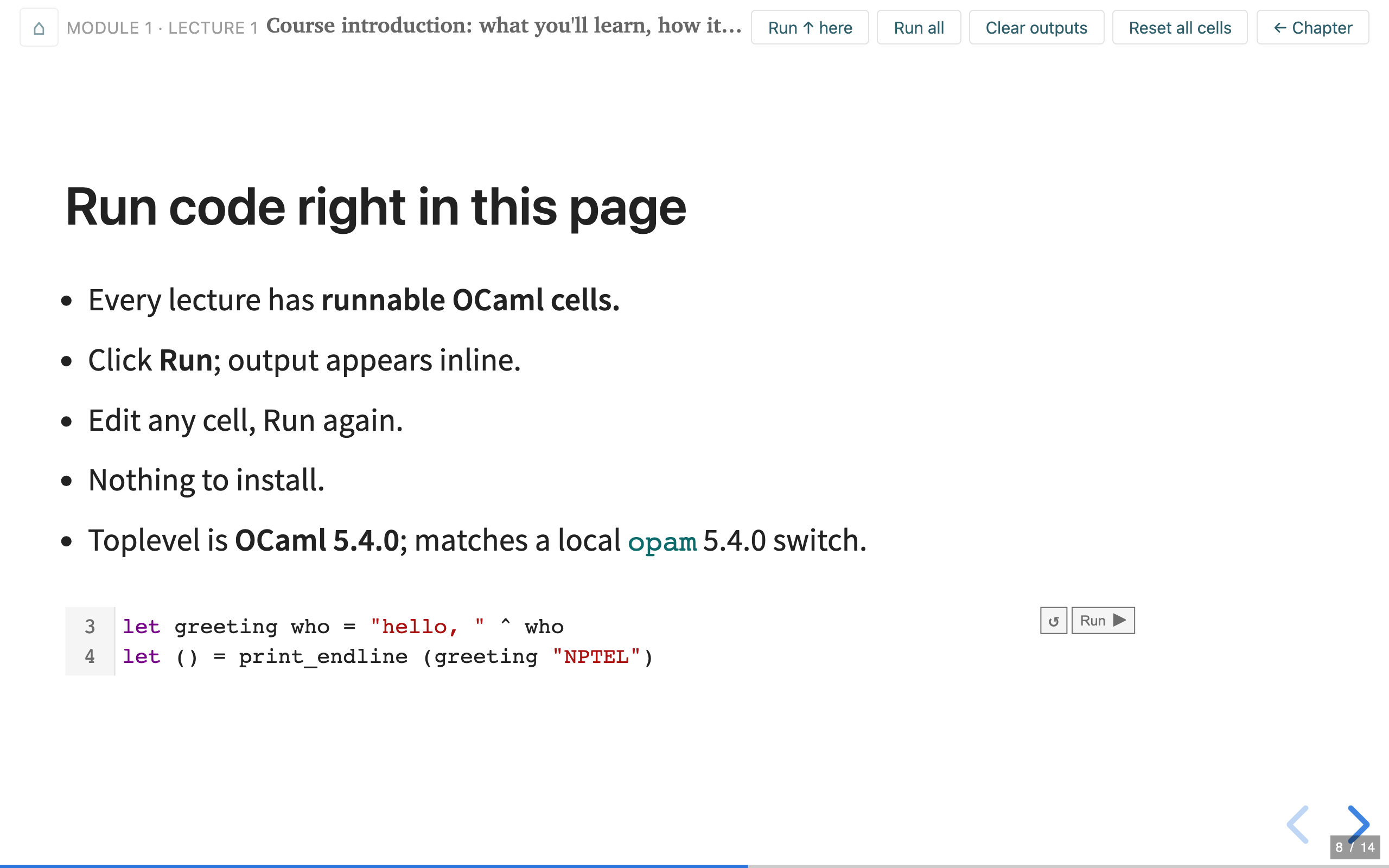
You are reading the book right now, in a sense. Here is a live cell.
If you are in a browser, there is a Run button near the top right.
Click it. Change "reader" to your own name and run it again.
The OCaml toplevel just ran in your browser. No server, no install, and the bytes never left your machine.
Why purely client side
The best thing about programming is that you can poke at it: change something, watch how it reacts, and learn from the reaction. Books cannot be poked. The usual fix is to read with an editor open alongside and type things in, but that always feels slightly off, because the book cannot assume you are playing along. It has no way to know you have the same compiler version, the same libraries, the same anything, so the interactive part drifts out of sync with the prose. I wanted the opposite: a book that assumes you are playing with it, because the playground is built into the page.
Where this course lives makes that matter even more. NPTEL is a MOOC; I never meet the students and there are no dedicated labs. A student might be on a laptop shared with a parent, on Windows 11, on a tablet with an external keyboard, or on some machine you would not expect to still be in use and that OCaml very likely does not support. Around 170 people have enrolled so far, and I do not want a single one of them to give up on OCaml over an installation problem in the first hour.
So the book is purely client side. The website is the textbook:
There is no separate textbook to buy or download. Every lecture in this course is also a page on the course website, and the slides you see in the videos are excerpts from those pages. The website is the book: the same material, expanded into prose, with the examples runnable in place and the quizzes interactive. Open it in any browser; no login, no install, nothing to download.
None of the individual pieces are new. Running OCaml in the browser
has been possible for years: the official
playground at ocaml.org,
TryOCaml, sketch.sh,
and x-ocaml itself, which this book is built on. What I think is
new is putting the pieces together: one course where the prose, the
slides, the runnable cells, and a full Linux machine are the same
thing, with tooling that keeps them correct and consistent. The rest
of this post is about how.
One source: page, slides, cells
There is a second reason the page matters as much as the video. When I teach CS3100, the executable notebook is the slide deck, thanks to the RISE extension that turns Jupyter cells into a reveal.js presentation. Students ask questions, and I answer them by live coding in the same surface I am presenting from.
This book rebuilds that idea, but purely in JavaScript. One markdown source produces the lecture webpage, a reveal.js slide deck, and the runnable cells, all from the same file. Since NPTEL videos show only the slides, the slides have to carry the full content, and because they are generated from the same source as the prose, they cannot drift away from it. More on that machinery below.
How it is built: two tiers
There are two tiers of execution.
The light tier is the cell you ran above. It is the
x-ocaml WebComponent
(Arthur Wendling’s work), an OCaml 5.4
toplevel compiled to JavaScript with
js_of_ocaml. What makes
it feel like a real editor rather than a
text box is that Merlin runs
inside it, in a Web Worker: hover over any expression and you get its
inferred type, you get autocompletion as you type, errors are
reported inline, and
ocamlformat will tidy
the code on request.
Scroll back up and hover over greeting in that first cell; the type
appears without your running anything. It all runs entirely in the
tab, your edits persist in local storage, and the whole
functional-programming half of the course lives in cells like it. I
have written before about
embedding x-ocaml in a blog; this
course is what that experiment grew into.
The heavy tier is for when a toplevel is not enough. To run a
test suite, measure coverage, compile and run a C program, or build
and boot an operating system, you need a real project on a real
machine: dune, several files, a test runner, a C compiler. So the
later modules embed a full 32-bit
Alpine Linux machine that boots inside
the browser tab, using the v86
x86-to-wasm emulator. It resumes from a compressed snapshot rather
than cold-booting, serves its filesystem lazily over 9p (you download
only the chunks your commands touch), and ships with OCaml
5.4 bytecode, dune, and gcc preinstalled. It is about 12 MB to an
interactive shell. The promise, quoting the course intro, is the same
as the cells:
nothing is installed on your computer and nothing runs on a server; the entire machine runs in the page.
Here is one, embedded in this post exactly as it appears in the
course. Click Start, wait a few seconds for the snapshot to load,
and you land at a shell in a hello project. Try ls, or
dune exec ./hello.exe to build and run it, or cat hello.ml. It is
a real Linux machine, booting in this tab, fetching the disk image
on demand from a CDN; nothing is installed on your computer.
A student can compile and run real C, or boot a unikernel, on a shared Windows laptop with nothing but a browser tab.
The two tiers trade off differently, and not only on size. The light cell is OCaml compiled straight to JavaScript, so once the one-time bundle has loaded (about 17 MB gzipped, then cached by the browser) it runs at JavaScript speed. The VM is the opposite. You are running OCaml bytecode inside a Linux guest inside an x86 machine emulated in WebAssembly, several layers of emulation deep, so it boots in a few seconds and then runs noticeably slower than a real machine would. That is why the light tier carries most of the course and the VM comes out only where a real build needs it. In both cases “zero install” means nothing is left on your machine, not that nothing is downloaded.
How I wrote the course: teaching the model how to teach
I have recorded video lectures for CS3100, my “Paradigms of
Programming” course at IIT Madras (the
lectures are on YouTube).
The pipeline that turns those into drafting material is
in the repo:
yt-dlp pulls each video from
that playlist, ffmpeg extracts the audio and
uses scene detection to pull out the slide stills, a local
Whisper model (run on my laptop
via Apple’s MLX) transcribes the
audio, and a small script aligns
each slide with the narration spoken while it was on screen. The
output is a drafting view that pairs every slide image with, in my
words, what I said about it. That is a good starting point for a
chapter: the model can see the slide and read the explanation.
The first drafts were rougher than I expected. The content was all there; what was missing was the pedagogy. The bigger problem was that the model found it hard to introduce only as much as a module needed and nothing more. It kept jumping to concepts that are either unfamiliar to the typical student or that belong to the latter part of the course: leaning on an idea a few paragraphs before introducing it, or stating a new concept flat instead of setting up the question it answers. The order was the order the slides happened to be in, not an order designed to teach. The oracle knew everything and was keen to show it; I needed not an oracle but a teacher. There is a name for that gap: pedagogical content knowledge, the knowing-how-to-teach a subject that is separate from knowing the subject itself. An LLM may be the purest case of the curse of knowledge: it has no built-in sense of what any given reader does not yet know.
So the real work became encoding how to teach in a form the model could apply consistently. That turned into a growing set of feedback notes, accumulated as persistent memory the agent loads every session. A few of the recurring ones:
- No forward concepts. Each module introduces one tool; earlier lectures stay inside the toolbox built so far. Before writing any example, ask what is in the student’s toolbox at this point.
- Slides carry the content. Most students only watch the videos, which show only slides. Every derivation, worked example, and comparison the student needs has to be on a slide, not gestured at.
- Fresh activities. An exercise must not ask for a function the chapter already walked through, even renamed.
- No jumps. The audience knows C and data structures, not FP and not type theory. Every new idea is motivated before use and reached by small steps. This one outranks “be thorough” and “show the powerful example.”
Later modules came out noticeably better than earlier ones, because the notes were richer by the time I got to them, and because I could re-run the review over earlier chapters with the accumulated rules.
The book should be read as a set of lecture notes rather than a polished textbook. It borrows organisation and broad ideas from Cornell’s CS3110 and Real World OCaml, alongside my own CS3100 notes, but I chose the examples and co-developed them deliberately rather than letting them be generated wholesale.
Under the hood: an executable, self-checking book
Once you have written down how the book should teach, how do you keep 345,000 words of interactive material from quietly violating those rules as it grows? By hand, you do not. So the build pipeline does the checking.
The book is executable and checked in CI. Every runnable
` ```ocaml ` cell in the lectures is compiled and run by dune
runtest (via ocaml-mdx)
on every change. If an example stops
compiling, the build fails. There are two nice details here. The
test prelude caps the bytecode stack so that a Stack_overflow demo
trips in CI at the same depth it trips in the browser, instead of
grinding for minutes; and it de-fangs OUnit2’s argument
parsing and
exit so that the very same test-suite cells a student runs in the
page also run green in CI. The code in the book cannot bit-rot.
One markdown source, three outputs. I write lectures with Pandoc-style fenced divs:
:::slide
## Pattern matching
- Match deconstructs and branches in one step
:::

:::quiz code id=bmi
Write `bmi : float -> float -> float`.
```ocaml
let bmi mass height = failwith "not implemented"
```
:::
The build (a small OCaml program) turns those into the webpage, the reveal.js deck, and the runnable or checkable cells, all from one file. The slides cannot drift from the prose because they are generated from it.
Checks beyond “does it compile.” One script walks every coding exercise and flags any that ask the student to reproduce a function the chapter already defined right above it, a repeat the early drafts kept slipping in. Alongside it run a per-slide overflow check (every slide must fit a 1280x800 canvas, verified by driving a headless browser), a cross-reference and anchor checker, and a single pre-recording gate that runs all of it before I record a lecture.
A composable in-browser toplevel. The testing module needs
QCheck and OUnit2 available in the
browser cells. Rather than ship a
second, heavier toplevel, those libraries are layered onto the
existing one using a small js_of_ocaml patch (--toplevel-extend)
plus a shim that isolates the extension’s domain-local state, so that
Merlin’s types-on-hover keeps working in the same page. Getting these
bundles small enough to ship was its own adventure, which I wrote up
in
shrinking the OxCaml js_of_ocaml bundle from 285 MB to 4 MB.
All of this is in the open. The course repository is public: the lecture content is under CC BY-NC-SA, and the build toolchain (the markdown-to-site compiler and the quiz backend) is ISC. If you teach OCaml and want the pipeline, the fenced-div system, or the in-browser VM tooling, it is yours to reuse.
Learning from the learners
I am borrowing an idea from the Brown PLT group’s quiz study for the Rust book. In Profiling Programming Language Learning (OOPSLA 2024), Will Crichton and Shriram Krishnamurthi added inline quizzes to the Rust book and analysed the responses to find where readers stumble, which questions discriminate well, and how targeted edits move the numbers. The lectures carry inline quizzes that come, as the intro puts it,
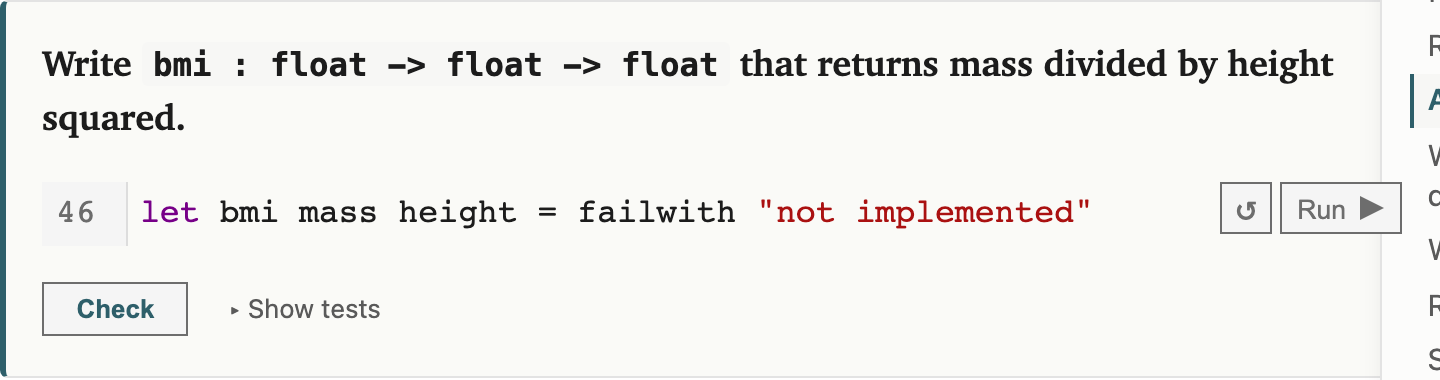
in two flavours: multiple-choice questions with explanations, and code-completion challenges where you fill in a function and click Check to run a set of tests against your solution.
Because the code quizzes run their tests in the browser, a code-completion question gives a real pass or fail, not a self-assessment. It is the same cell machinery as the rest of the book: a stub to fill in, a Run button, and a Check that runs hidden tests against your answer.
The quizzes matter to me because of the feedback loop. The site records anonymous responses: a random per-browser id, no account, no IP address, no personal data, not even a copy of the code you type. I get to see which questions trip people up, on a live dashboard, and fix the material around them. The privacy page has a per-device opt-out and a delete-my-data button. I would much rather find out where readers actually get stuck than guess.
For that signal to be trustworthy, two things have to line up. Each page is stamped with the commit SHA of the source it was built from, and every quiz carries a stable id, so a response correlates to an exact version of the book, and reordering questions never silently re-attaches old answers to a new question.
What is in the book
Nine of the twelve modules are recorded; I expect to finish the last three in a week or two. The shape is eight modules of functional programming (values and types, functions and recursion, algebraic data types, pattern matching, higher-order functions, modules and functors, and effects) followed by four on building real systems: testing, memory safety, OxCaml, and unikernels. A few highlights of the content itself.
The memory-safety module leans hardest on the VM. It runs the full Linux machine in the page, and students compile and run real C while watching buffer overflows, use-after-free, and undefined behaviour happen live. No install, no separate sandbox, on whatever machine they happen to have.
The testing module covers unit testing with OUnit2, property-based testing with QCheck, and model-based testing, all runnable in the browser. Testing is a natural on-ramp to thinking about correctness, and being able to actually run a shrinking counterexample in the page makes the ideas land.
The OxCaml module is the most volatile. It grows out of the OxCaml lecture in CS6868, my concurrent programming course at IITM, and covers locality and stack allocation, uniqueness, linearity, contention, and portability: the mode system that gives data-race freedom and allocation control. It is very new and very likely to keep changing. What is the fun in only teaching things that have already ossified? If you want the deeper version of this material, I have written about data-race freedom in OxCaml and capsules separately.
The MirageOS module at the end builds a unikernel from OCaml: a library operating system, virtualisation for isolation, and language safety, brought together into a single specialised VM. This module is less hands-on than the rest. A 32-bit VM under wasm cannot build a unikernel quickly, and full qemu emulation in the browser would be painfully slow, so the interactive surface is thinner here. The thing I would love to reach is booting a compiled unikernel directly in wasm via WASI, with no Linux host underneath at all. That would make the last module as live as the rest.
LLM use, in numbers
I wrote this book with an LLM, mostly Claude Code, and reviewed all of it myself. Here is the lifetime token usage for the repo:
| Category | Tokens |
|---|---|
| Input (fresh, uncached) | 3.1M |
| Output | 36.1M |
| Cache creation | 168.2M |
| Cache read | 11,055.2M (~11.1B) |
| Grand total | ~11.26B |
By model: Opus 4.7 about 5.1B total (14.3M output), Opus 4.8 about 5.1B total (17.4M output), and Fable 5 about 1.1B total (4.4M output). The two Opus figures cover the whole month; the Fable 5 figure is roughly a single day, the time it had been available when I pulled these numbers.
How to read this. The headline 11.3B is dominated (98%) by cache reads, which are billed at roughly a tenth of the input rate and are huge only because every turn re-reads the conversation from cache. The figures that reflect real work are output (36M) and cache creation (168M) plus fresh input (3M), call it about 207M tokens of non-cached traffic. At rough Opus list rates that lands somewhere around 2,800 to 3,000 US dollars over the lifetime of the repo, split roughly evenly between Opus 4.7 and 4.8 with Fable adding about ten percent.
Beyond drafting, two things helped.
The first is fearless, though not perfect, refactoring. “Move this example to that other module, and rewrite everything downstream so it still makes sense” is a request I made constantly, without worrying about the breakages it would cause across two dozen files. The history is full of these: a wholesale redesign of the secure-systems modules, a restructuring of the unikernels module from six lectures down to four, a reframing of a lecture around effects and a typed stack machine. The shape of the development is visible if you plot it:
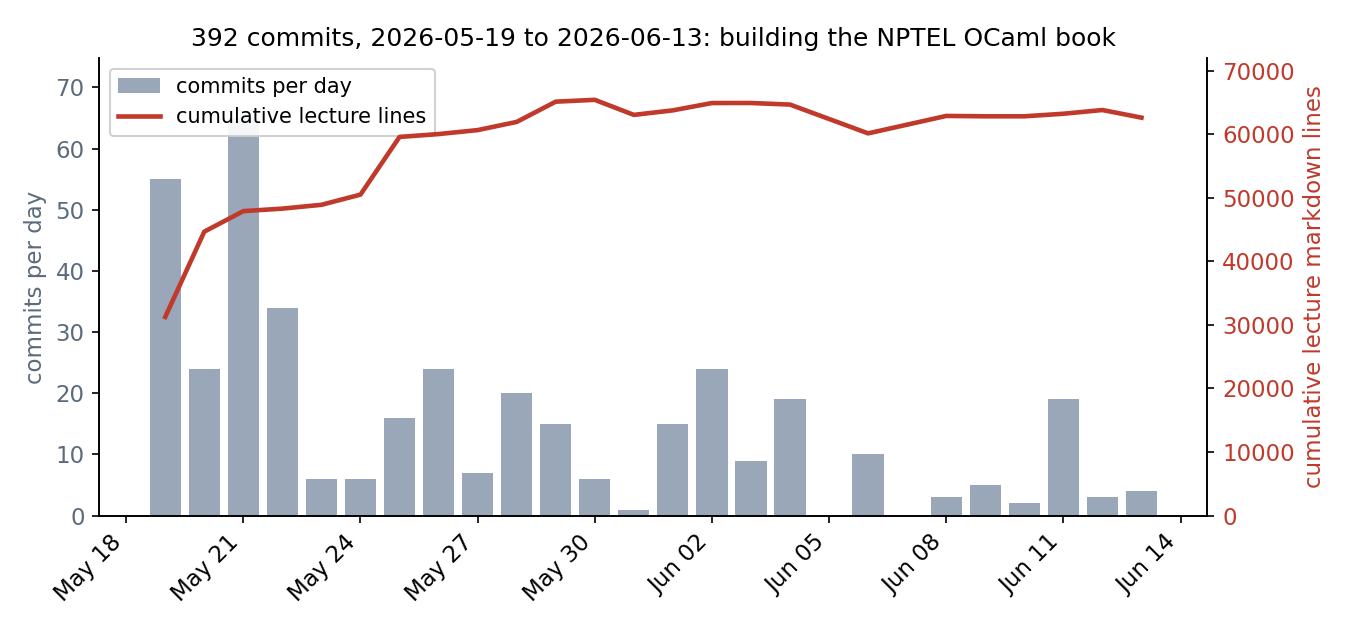
392 commits over about 25 days. Most of the lecture text lands in the
first three days; after that the line count is almost flat while the
commits keep coming. In that stretch, most of the effort after the
first draft is rewriting in place, not adding,
and about a quarter of the commits are explicit review, audit, or
sweep passes. The handful of enormous diffs are regenerated
js_of_ocaml and Wasm bundles, not prose; the plotted count is
lecture markdown only.
The second is review. I have the LLM read chapters back against the pedagogy notes to catch content that came out of turn: an idea used before it was introduced, an exercise that duplicates the chapter, a slide that overflows. Fable 5’s single day above went mostly on this pass, and it flagged a large batch of such issues in one sweep. Even so, there are surely still bugs in the book, and for those I take responsibility; the review was mine to do.
Where this is going: a book that evolves with the reader
Here is what I wish for next.
Imagine the book ships with an LLM that acts as a tutor. It sets exercises, takes your feedback, and dynamically rewrites parts of the book as you read, keeping the difficulty where it should be for you specifically: enough challenge to stay engaged, not so much that you give up. For the coding parts, the tutor can close its own loop: write a program, compile it, test it, and only then generate a question from it. That way the questions are produced autonomously but with a real notion of correctness behind them, rather than hallucinated.
Typed languages look especially well suited to this. OCaml’s compiler is a correctness oracle the tutor can lean on, and the entire compile-and-test loop already runs client side here, the light tier for cells and the full VM for real projects, so the tutor needs no server either. The anonymous feedback signal is the seed of this loop, and the LLM-authoring pipeline already shows the rewriting half is feasible. The best way to learn is still to poke at something and see how it reacts; a book that pokes back, and adjusts, is where I would like this to go.
Enrol
If you would like to learn OCaml this way, the course is open for enrolment on NPTEL until 27 July 2026, and it is free. Or just open a lecture and poke at it.
